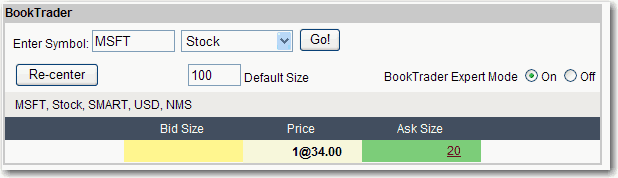
Use BookTrader to Send Orders
The BookTrader feature allows you to transmit orders with a single click from the deep book view. To activate single-click order transmission you must turn on BookTrader Expert Mode. Use BookTrader to trade stocks, options, futures, futures options and bonds.
Transmit Instantaneous Orders with BookTrader
Add the BookTrader feature to a trading page.
Enter the underlying symbol, select an instrument type and click Go! Choose a contract from the list.
If desired, modify the default order size. If you use instantaneous transmission, the default order size is used. You can't change the order quantity on a per-order basis for single-click orders.
Activate single-click order transmission by clicking the On radio button next to BookTrader Expert Mode.
To activate expert mode, you need to accept the terms and risks of using single-click order transmission by checking OK in the message box.
Click an Ask Size price in the price ladder to transmit a Buy Limit order at the selected price.
Click a Bid Size price in the price ladder to transmit a Sell Limit order at the selected price.
Create Orders with BookTrader
Add the BookTrader feature to a trading page.
Enter the underlying symbol, select an instrument type and click Go! Choose a contract from the list.
If desired, modify the default order size. You can also change the order quantity on a per-order basis in the Create Orders box.
Set order parameters and Preview or Send the order.